
A game stutters, a player freezes, or a button press seems to arrive a moment late, and everyone says the same word: lag. But that one word covers at least two separate problems with different causes and different fixes. One lives in your device. The other lives in the network between you and the game's servers.
This guide explains the difference, shows how games hide network delay, and gives you a simple way to tell which problem you actually have. If you build games rather than play them, the later sections cover what developers can measure and fix.
Lag Is Not One Problem
How-To Geek's explainer separates the two main causes. Lag comes from the connection between your computer and the game's servers. High latency, usually called ping, makes your actions register late, and other players may freeze or seem to teleport. Low FPS means your computer cannot keep up with the game, so the whole picture looks slow or choppy. The two are independent: your frame rate can stay high while the network lags.
They can also happen together. The same article gives a crowded city in a large online game as an example, where the server is strained and your computer is struggling to draw many characters at once.
The Quick Way to Tell Them Apart
| What You Notice | Likely Cause | Where It Happens | What Usually Helps |
|---|---|---|---|
| The whole game looks slow or choppy | Low frame rate | Your device | Lower graphics settings, close background programs, better hardware |
| Actions register late, other players freeze or jump | High ping | The connection to the server | A closer server, Ethernet instead of Wi-Fi, a better connection |
| Short freezes while the average frame rate looks fine | Uneven frame time | Your device | Find and fix the slowest frames |
| Everyone in the match lags at once | A struggling server | The game's servers | Nothing on your side; try another server or wait |
Treat the table as a starting point, not a diagnosis. Real problems overlap, and the sections below explain why.
Low Frame Rate: Your Device Is Behind
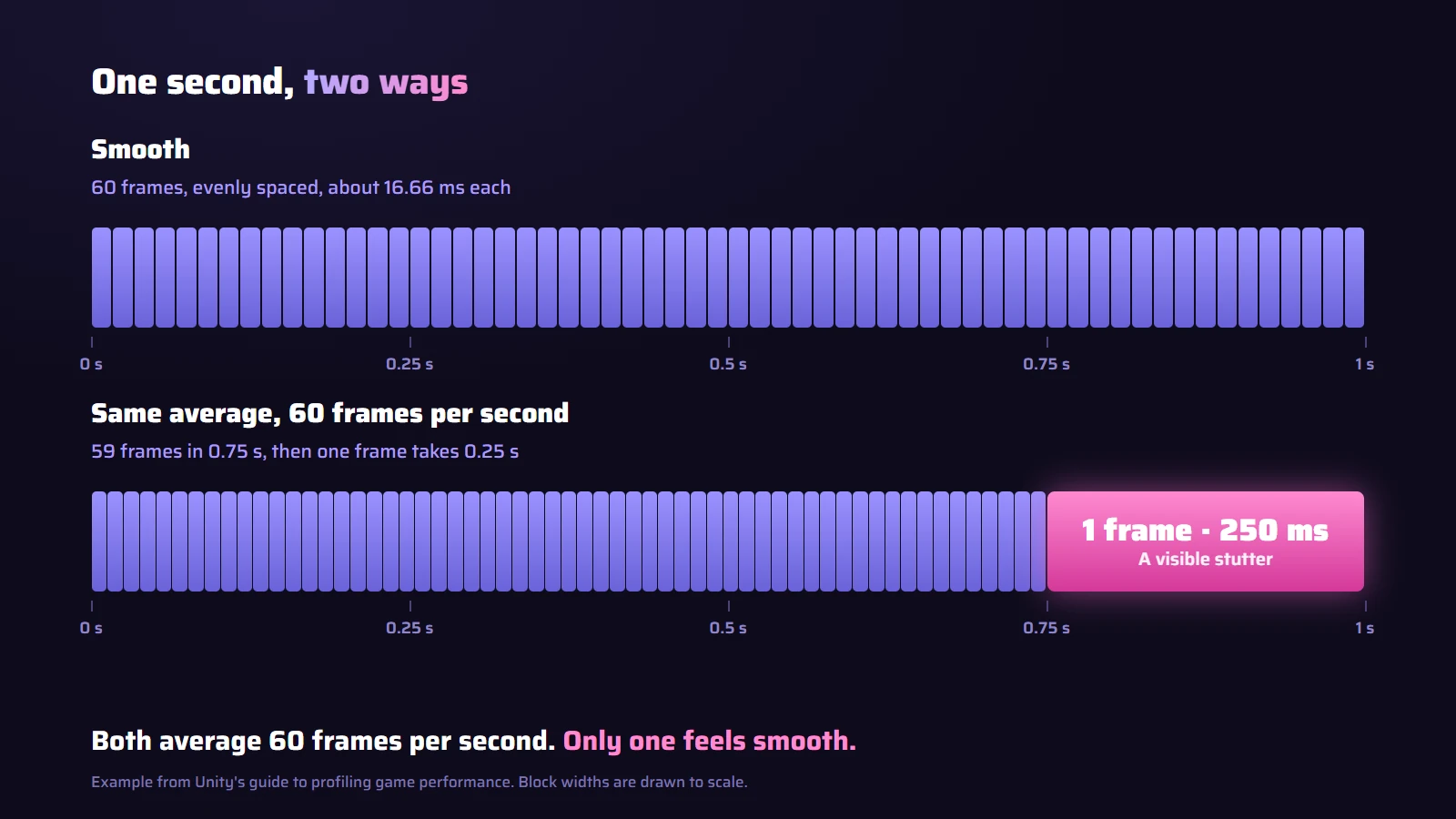
A game draws a new picture many times a second. Each picture is a frame, and the time one frame takes is its frame time. A game running at 60 frames per second has about 16.66 milliseconds for each frame, and one running at 30 frames per second has about 33.33 milliseconds, according to Unity's guide to profiling game performance. If your computer or phone takes longer than that, frames arrive late and the game looks slow.
Frame time matters more than the frames-per-second number, because an average can hide trouble. Unity gives an example: 59 frames in 0.75 seconds, then one frame that takes 0.25 seconds. The average is still 60 frames per second, but that one long frame is a visible stutter. This is why a game can report a healthy frame rate and still feel rough.
The causes are local. How-To Geek lists a weak graphics card, processor or memory, a slow drive, and other software running in the background. The fixes are local too: lower the graphics settings, close other programs, or upgrade the hardware.
High Ping: The Network Is Behind
Online games usually follow a client-server model. Game developer Gabriel Gambetta describes it in his Fast-Paced Multiplayer series: the server alone manages the game state, players send their inputs, and the server sends back the results. Because the client is never trusted, a modified game cannot simply give itself extra health or walk through walls.
The cost is delay. Data cannot travel instantly, and Gambetta notes that even a short trip across a country takes tens of milliseconds, with congestion pushing delays to 100 to 500 milliseconds. If the client waited for the server to confirm every action, the player would press a key and see nothing for a moment. He says a lag of half a second makes a game unplayable.
That is ping: the time a message takes to get to the server and back. Distance, routing and congestion all add to it, which is why a nearer server and a wired connection tend to help.
How Games Hide Network Delay
Developers cannot remove network delay, so they hide it. Gambetta's series describes the standard techniques.
- Client-side prediction. The game applies your input to your own character immediately, as if the server had already agreed. Most inputs are valid, so the guess is usually right and the game feels instant.
- Server reconciliation. Each input carries a sequence number. When the server's update arrives, the game resets to the server's version and replays the inputs the server has not yet handled, so your character does not jump back and forth.
- Entity interpolation. Other players' characters are drawn slightly in the past, moving smoothly between the last two positions the server sent. In his example the delay is about 100 milliseconds, the gap between server updates.
These techniques explain some of the strange moments in online play. You see yourself act instantly, but other players are always a little behind. When a prediction turns out wrong, the correction can look like a small snap. And because other characters are shown slightly in the past, aiming at a moving target can feel off, which is the problem lag compensation tries to solve.
How to Tell Which One You Have
- Turn on the game's frame rate and ping display, if it has one, and watch both when the problem happens.
- If the frame rate drops and the picture looks choppy, the cause is on your device.
- If the frame rate stays high but other players freeze or your actions arrive late, suspect the network.
- If the picture and the network both look fine but the game still feels slow to respond, the delay may be somewhere else in the chain, so test one change at a time.
- If everyone in the match has the problem, the server may be the cause, and you cannot fix that yourself.
What Developers Can Do
For anyone making a game, the lesson from both halves is the same: measure first, then fix the right thing.
- Set a frame time budget and measure in milliseconds, not only frames per second. Unity recommends this, because a few long frames hide inside a good average.
- Profile on the lowest-end device you support, not only on a fast development machine.
- For multiplayer, plan for delay from the start. Prediction, reconciliation and interpolation are far easier to design in early than to add later.
- Test on slow and unstable connections, not only on a fast local network.
Cost is part of this too. Networking and performance work add time and people to a project, which is one reason multiplayer games cost more to make, as we cover in how much it costs to make a game. And the engine you choose shapes how you profile and tune, which we compare in our game engine guide.
Frequently Asked Questions
Lag is a network problem: your actions reach the server late. Low FPS is a local problem: your device cannot draw frames fast enough. Your frame rate can be high while the network lags, and the reverse.
Ping measures the round trip between you and the server. High ping is a common cause of network lag, but lag is the symptom you notice, and a struggling server can cause it even when your own connection is fine.
The frame rate is an average. A few frames that take much longer than the rest cause a visible stutter, even when the average stays high. Frame time, measured per frame, shows these spikes.
No. Low FPS comes from your device, such as the graphics card, processor, memory, drive or background software. Faster internet helps with network lag, not with drawing frames.
Sources
- HTG Explains: Why Lag and Low FPS Aren't the Same ThingHow-To Geek
- Fast-Paced Multiplayer (Part I): Client-Server Game ArchitectureGabriel Gambetta
- Fast-Paced Multiplayer (Part II): Client-Side Prediction and Server ReconciliationGabriel Gambetta
- Fast-Paced Multiplayer (Part III): Entity InterpolationGabriel Gambetta
- Best practices for profiling game performanceUnity